Storyboarding with AI: Nano Banana Tips
While storyboarding for one of our latest project, we decided to finally dive into the deep end with one of those infamous AI image generators..
After a bit of research, we landed on our tool of choice: Gemini Nano Banana. We chose it because it promised something revolutionary for our workflow: the ability to generate photorealistic images, letting us render scenes that were previously impossible to visualise this early on. It’s a game changer for creating powerful proof of concept and helps us convince clients to commit to more ambitious ad ideas.
When we chose our tool, the magic began…
But don’t get us wrong. It was far from a straightforward path to perfect results. It took many long hours of conversation with the devil (or as you might call it, the chatbot) before we finally found a workflow that clicked.
We don’t believe in gatekeeping, so we’re sharing all the tips and tricks that worked for us:
1. It All Starts with the First Prompt
Let’s be real, the chatbot can’t read your mind (yet!). So, until that day comes, you need to be its guide, sorry! A great prompt usually boils down to three key ingredients:
Subject (The Who/What): Who’s the star of your show? (e.g., a fluffy, white Persian cat)
Setting (The Where/How): What’s your subject doing and where is it? (e.g., …sitting on a sleek black chair in a sunlit kitchen, flipping through a book)
Style (aka The Vibe): What should the image look like? An oil painting? A super realistic photo? You decide!
2. Get specific or Get Suprised
While “fighting” with AI, remember that it thrives on detail. Want a closeup shot? Tell it! Craving a moody, pastel color scheme? Specify it! If you don’t steer, the AI will, and you might not like where you end up. Don’t leave your vision to chance. You don’t want to end up dissapointed.
3. Your First Prompt is Just a Starting Point
Sometimes you don’t know exactly what you want until you see what you don’t want. That’s totally fine! Look at your first results and ask yourself: “What can I change?” Use those images to get inspired, then go back and polish your prompt. Editing the main prompt is how you guide the AI toward that perfect final image.
4. The Anchor Method for Character Likeness and Consistency
Achieving character consistency can be tricky, but the golden rule is to lock down a successful prompt. Drastically changing your core character description will generate a new person. For best results, always pair this prompt with a high quality reference photo to act as a visual anchor. To create new scenes, reuse that exact prompt and photo, which allows for countless variations while ensuring your character remains consistent. Remember to thoughtfully edit your prompt for changes rather than just regenerating, it will save you from the frustration of wanting to go back to sketching!
5. From Snapshot to Storyboard: Creating the Scene
A storyboard isn’t just a pretty picture; it’s a narrative. Once you have your character locked in using the Anchor Method, you need to make them act.
To show a true storyboard sequence, we took our “fluffy white Persian cat” and built a three-frame narrative arc. Notice how we kept the setting consistent (sunlit kitchen, black chair) but changed the action prompts to drive the story forward:
Frame 1: “A fluffy white Persian cat sitting on a sleek black chair in a sunlit kitchen, reading a book. There is a cup of coffee on the table next to the chair. “
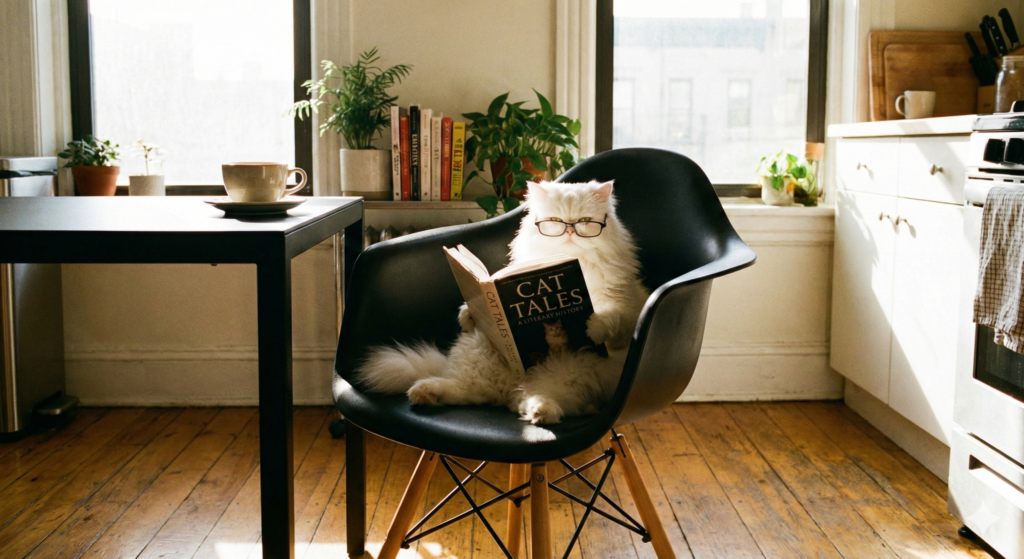
Image created with Gemini Nano Banana Pro.
Frame 2: “The same white Persian cat looks up in shock, knocking a coffee cup off the table with its paw, the book sliding off it’s lap.”
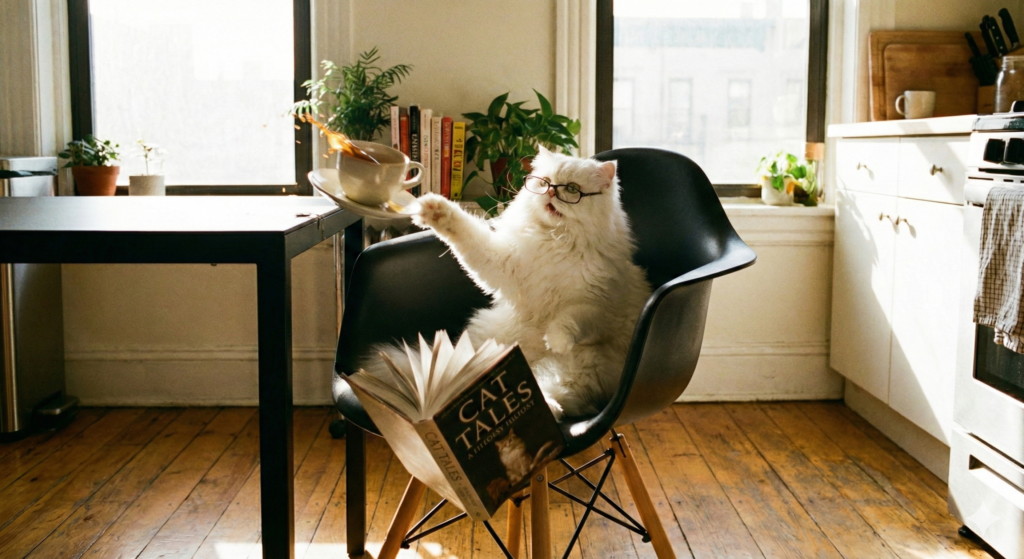
Image created with Gemini Nano Banana Pro.
Frame 3: “Close up of the white Persian cat peering anxiously over the edge of the black chair at a spilled puddle of coffee on the floor.”
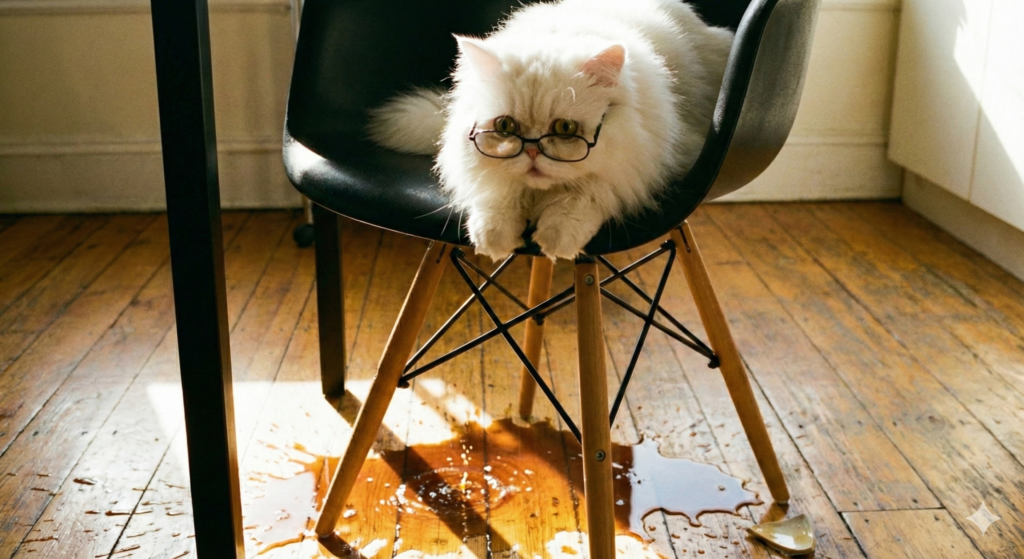
Image created with Gemini Nano Banana Pro.
An Extra Tip for When You’re Feeling Frustrated…
Friendly reminder: Telling the AI it’s doing a terrible job is like yelling at your car, it doesn’t really care and you’re just wasting energy! Instead, take a deep breath, grab a coffee (or matcha!) and come back with a clear head.
What Types of Content Can Gemini: Nano Banana Create?
For us it is all about getting clients excited by an idea; so generating fast-turnaround storyboards, mood boards or even as single conceptual image is useful. We tend not to use AI directly in our work but we do want to work fast and communicate ambitious ideas. In fact, we even empower & train marketing & PR teams how to use their transferable skills like copywriting so they can use platforms like Nano Banana seamlessly and add to their skill-base.
If you’d like us to impart some wisdom and help your team learn the fundamentals of image generation; character consistency, prompting and how craft a top quality storyboard to pitch to your clients, drop us a line: info@blackcliffedia.com